|
Note: Please close or minimize this web browser window to return to the defenderData application. Select Help > News from the defenderData file menu to view these news postings again.
Monday, April 16th 2018
Juvenile Sentencing Data Collection
District Defenders:
Staring Monday April 16 we have new features for capturing important data in delinquency cases regarding the site of the arrest and the nature of sentencing. Your district has agreed to participate in this project which requires entry of the incident location as well as detailed information on sentencing to help better understand the nature of juvenile justice in our state. Upon closing a case, if these fields have not been completed you will receive a pop-up message reminding you to complete these fields before closing. If you have any questions, consult your District Defender or supervisor. Thanks for helping with this most important project.
Monday, October 18th 2016
Statute Updates
District Defenders:
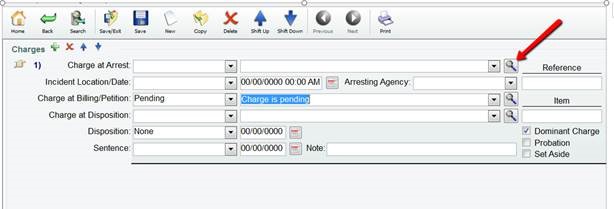
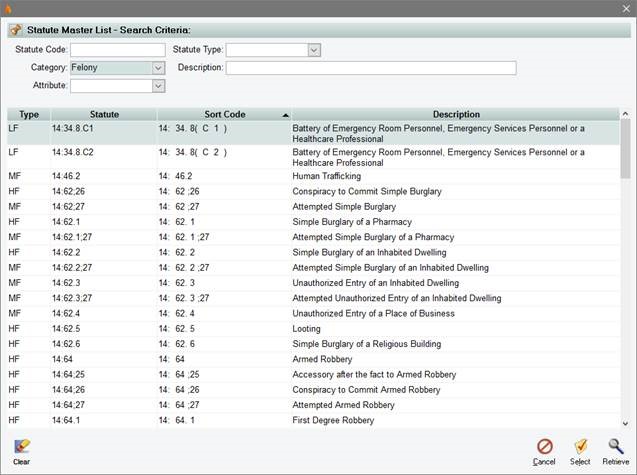
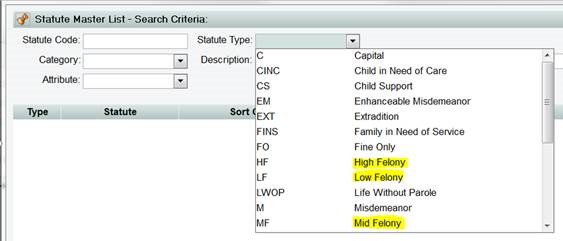
We are building a new charge code table in which we have so far already included over 2,000 offenses, entering minimum and maximum sentences and a variety of other attributes such as statue level. Statute level is a more refined case-type (eg. Misdemeanor, Enhanceable Misdemeanor, High- Medium- and Low-grade felonies). These new more detailed levels will allow us to better measure workload and caseload, since the old, current standards count one level of misdemeanor and one level of felony (so third-possession of marijuana is counted the same as brutal battery.) However, the data entry user will simply do as they have always done and enter the (old, familiar) casetype and the charges and the database will allow us to divvy them into more refined levels in the analyses without any interference with the data entry personnel. For those users who search for statutes using the magnifying glass button on the charges tab, they will see a different search screen as illustrated in the snips below:
- Click on the magnifier icon:
- The following search criteria appears:
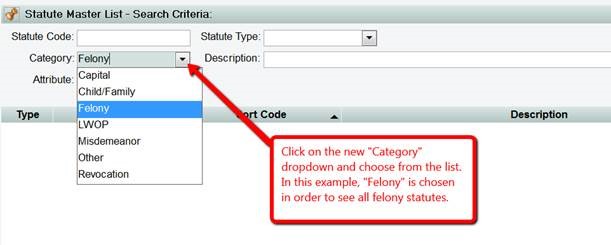
- Click “Retrieve” from the bottom of the screen:

- The output displays as shown below:
- Note you will also see a “Statute Type” dropdown in which you may notice some new statute types such as high, medium and low felony. (HF, MF & LF):
Thursday, October 15th 2015
Timekeeping Updates
The LPDB defenderData system will receive upgrades to the Timekeeping feature which will be available starting Monday, October 19th. In order to deploy this feature, the defenderData system will be offline the morning of Saturday, October 17th from 10:00 am CT through 12:00 pm CT.
Once deployed, you will notice that the Timekeeping procedure is much more refined and detailed. If you would like to schedule a training for your district please contact Dr. Stilling or Gina Carley at 225-219-9305. We apologize for any inconvenience this may cause in the short-term but we are certain that you will find this much-improved feature to be useful.
Friday, May 1st 2015 - 4:00pm CDT
Link Feature:
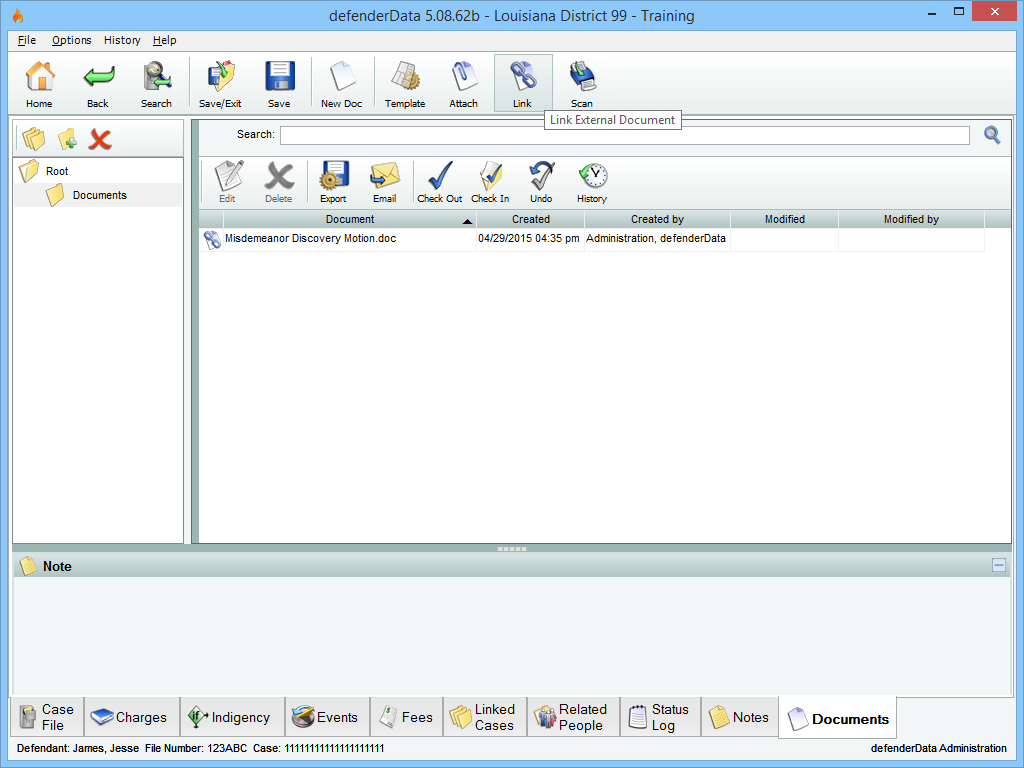
A new Link feature has been added to the Documents tab in case edit. This feature is intended to be used with documents that are too large to Attach to the case (larger than 50 MB). This is done by creating a Link to a document which is stored on your local network rather than uploading the document to the database.
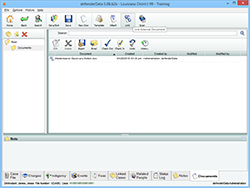 Enlarge picture Enlarge picture
Important Notes:
- Creating a Link to a document on a shared network drive rather than a document that's stored on your computer is highly recommended. Other users won't be able to access a Linked document that's stored on your own computer.
- Linked documents can only be accessed when logged in with the defenderData Windows application on a workstation which has access to the relative path on your network where the document is stored.
- Linked documents cannot be accessed from the defenderData Web application.
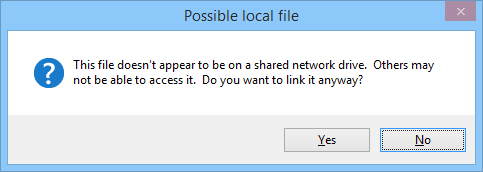
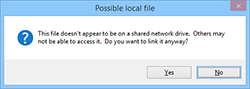
- The following warning will be displayed if a Link is created to a document that's stored on your own computer:
 Enlarge picture Enlarge picture
Sunday, July 16th 2014 - 8:00pm CDT
System Updates:
The defenderData Case Management system was updated this weekend to include the new coding system for Case Results and Charge Dispositions, as well as a number of other enhancement requests received over the past few months as detailed below.
Thanks to all who attended the Case Management System Training Sessions in early May. We received a good deal of constructive comments on the existing system and on the proposed changes to the Result and Disposition Codes.
Please refer to the Data Entry Guide within the Online User Manual which should help answer any questions you may have as to which codes to use and in what circumstances.
Also included is the PowerPoint presentation we used during the trainings which a number of you have asked for, but please refer to the Data Entry Guide to determine appropriate codes to use.
Please let us know if you have any addition questions or suggestions for improvements we can make to the system in the Justice Works Tracker (at least one person in each district should have access to this system).
There may be a few bumps in the road as you get used to these changes, but with your input and patience, we hope that the changes will make the job of tracking important case information easier and more accurate.
Erik Stilling, Ph.D.
Information & Technology Management Officer
5.08.46 Release Notes:
- New Case Tabs added:
- Empty Tab Indicator shows which case tabs contain content with black text
- Note Search mode added (accessed from the main toolbar within Case Search)
- Load Custom Range function added to the Timesheet
- Recent Time Entries appear on the Home Screen
- Saved Search feature added for Case Search & Reports (select the Save icon to the upper-right from these areas)
- In most edit screens you’ll find a separate button now for Save/Exit and Save
- Schedule performance improvements
- Usability of datetime fields improved:
- By default, only the month/date are automatically selected making it easier to reschedule events
- Pressing Tab will advance from the month/date to the hours:minutes
- Typing 01, 02, 03, 04, 05 will default to PM instead of AM
Monday, April 16th 2014 - 4:30pm CDT
Announcement:
It has come to our attention that in rare instances, clients will elect to represent themselves (pro se), and the judge will note on the record that the attorney is withdrawn while still requiring the attorney to remain on the case in a consult-only capacity.
Because this may result in just as much or even more work than normal for the attorney, you should keep the Case Status as "Open" and select "Pro se - Consult Only" as a new Event on the case so that we accurately capture the workload in a count of open cases.
When the attorney is no longer consulting on the case, the Status should be set "Closed."
Saturday, September 11th 2013 - 6:00pm CDT
Case Type Changes:
The following Case Types have been removed, existing cases have been merged with the Juvenile Case Type as follows:
| Removed |
New Type |
Sub Type |
| Child Support |
Juvenile |
Child Support |
| Child Support Contempt |
Juvenile |
Child Support Contempt |
| Child Support Decrease |
Juvenile |
Child Support |
| Child Support Increase |
Juvenile |
Child Support |
| Fix Child Support |
Juvenile |
Child Support |
| Fix Child Support |
Juvenile |
Child Support |
The following Case Types have been renamed:
| Prior Name |
New Name |
| Life |
Felony-LWOP |
| Parish/Municipal |
Parish/Municipal Ordinance |
Under the Juvenile Case Type, the Capital and Delinquency Sub Types has been inactivated. Existing Delinquency cases have been moved to the Delinquency-Fel Grade and Delinquency-Msd Grade
Sub Types as applicable based on Charge level. In addition, the following Juvenile Sub Types have been renamed:
| Prior Sub Type |
New Sub Type |
| Child Support Decrease |
Child Support |
| Felony |
Delinquency-Fel Grade |
| Felony-LWOP |
Delinquency-Juv Life |
| Fix Child Support |
Child Support |
| Misdemeanor |
Delinquency-Msd Grade |
| Parish/Municipal |
Parish/Municipal Ordinance |
Monday, August 22nd 2013 - 4:30pm CDT
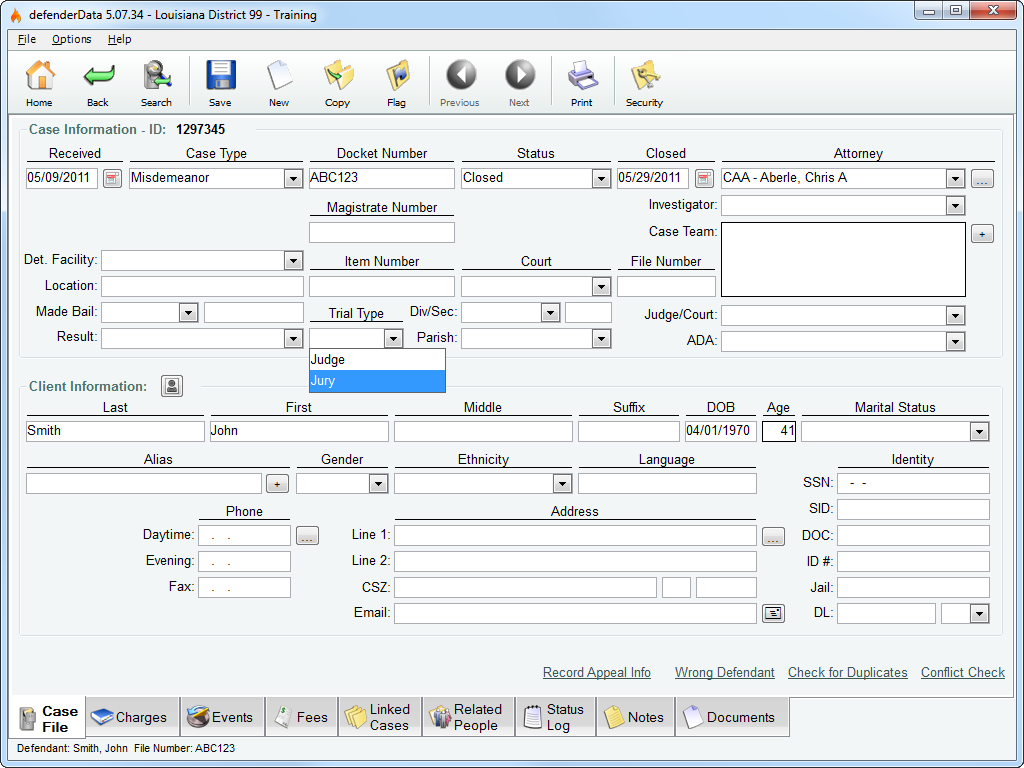
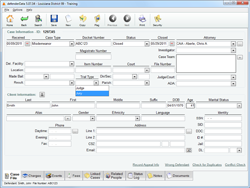
A Trial Type field has been added to the Case File Tab under Case Information for statistical tracking, be sure to select the appropriate Trial Type for all case that go to trial as shown below.
 Enlarge picture Enlarge picture
Monday, July 11th 2013 - 6:00am CDT
Juvenile Case Types:
The following Case Types have been removed, existing cases have been merged with the Juvenile Case Type as follows:
| Removed |
New Type |
Sub Type |
| CINC-Child |
Juvenile |
CINC-Child |
| CINC-Parent |
Juvenile |
CINC-Parent |
| Delinquency |
Juvenile |
Delinquency |
| FINS |
Juvenile |
FINS |
Tuesday, June 28th 2013 - 2:30pm CDT
Reminder for submitting Appeal details:
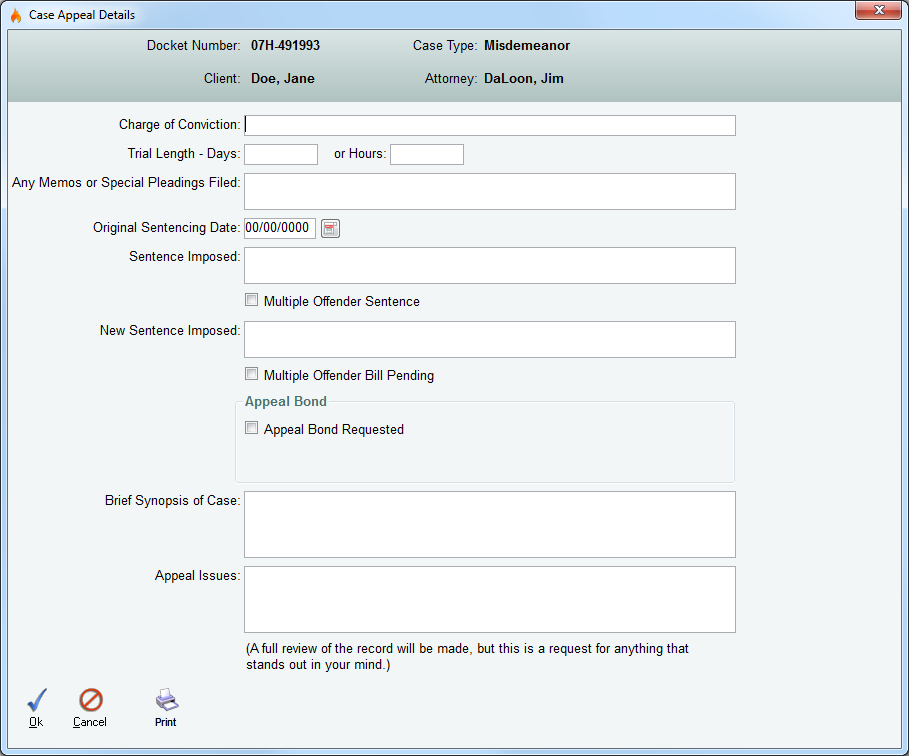
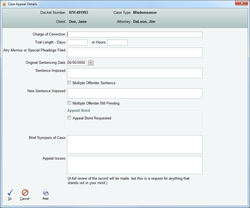
The preferred method for submitting Appeal information to LAP is to use the "Record Appeal Info" link found toward the bottom-right corner of the Case File tab.
As shown below, a Case Appeal Details window will be displayed where the relevent details can be entered. When clicking "Ok" from this screen all information is automatically sent to LAP.
 Enlarge picture Enlarge picture
Thursday, June 23rd 2013 - 5:30pm CDT
5.07.15 Release Notes:
The following updates have been completed for all Districts:
- Performance improvements to reduce login time, faster case loading and case saving.
- A warning dialog window is displayed when a duplicate Docket # is entered on a new case.
- Case Age will reset to 0 days when edits are made on any tab/screen.
Thursday, June 3rd 2013 - 1:00am CDT
5.07.03 Release Notes:
The following updates have been completed for all Districts:
- Automatic email notifications are sent to Attorneys for new case assignments.
- Administrators can configure email notifications for all users from the Admin > People > Security menu. When editing a user account, "Email Alerts" and "Email Tasks" may be toggled on/off.
- The Timesheet window is now available from the Home Screen. The Timesheet provides quick & convenient access for logging your Time Entries in the system. For additional details, please see the Online User Manual.
- Appeal Info is automatically sent to the Louisiana Appellate Project. To enter Appeals information, edit a case and then select the "Record Appeal Info" link found in the lower-right corner of the Case File tab.
Note to Administrators: It is no longer necessary to manually add a Juvenile Flag to Juvenile cases. All types of Juvenile cases are entered under the Juvenile Case Type, allowing for permissions to Juvenile cases to be managed at for each user. The Case Type Parameter is also included in various search screens and reports.
Monday, May 20th 2013 - 7:45pm CDT
Recorded Training Webinars
If you were unable to attend one of the live training sessions, recordings are available here:
Monday, May 20th 2013 - 11:00am CDT
The final data conversion has been completed and all user accounts are now active. Please note, District Administrators will need to configure user access rights before all users will have access to their cases.
|
|
 |
|